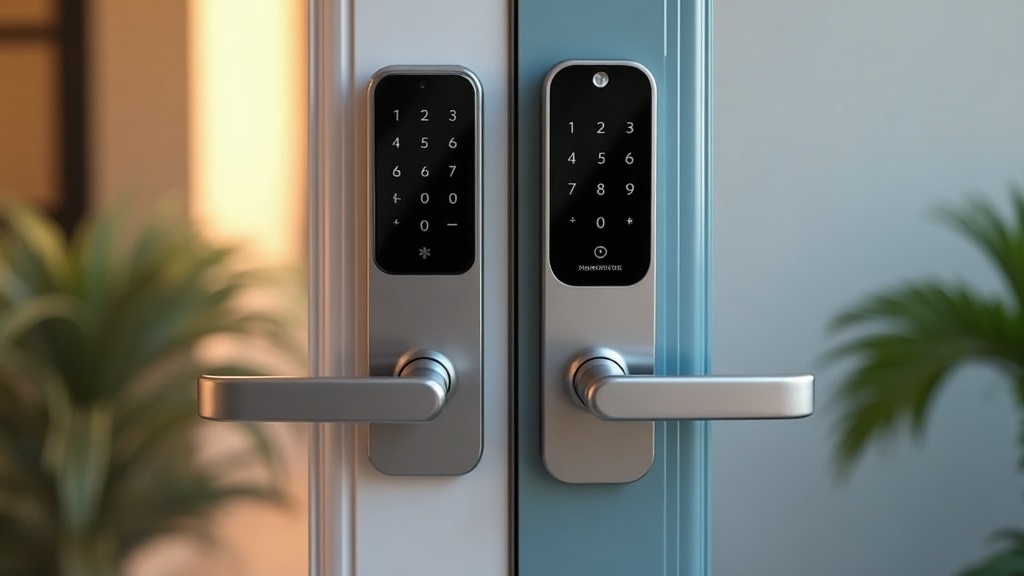
If you want a smart lock under $200 in 2026, the shortlist gets short fast. Most of the truly good ones are either $250-plus flagships or cheap keypad locks that can’t talk to your phone properly. But two locks keep landing in the sweet spot: the Eufy Smart Lock E31 and the Aqara Smart Lock U200. Both hover right around the $180 mark, both do fingerprint unlock, and both play nice with Matter. On paper they look like twins.
They are not twins. I’ve spent a lot of time reading through the spec sheets, owner reviews, and expert teardowns on both, and there’s one difference that decides this whole matchup for a lot of buyers: only one of these locks actually supports Apple Home Key — the tap-your-iPhone-to-the-lock feature that’s become the single hottest smart-lock buying criterion of 2026. If you assumed both had it, you’re not alone. You’d also be wrong, and it would cost you.
So let’s settle it — honest verdict, six head-to-head rounds, and a clear “buy this one if” at the end.
Quick verdict: The Aqara U200 is the smarter buy for most Apple households and renters. It’s the only one of the two with true Apple Home Key tap-to-unlock, it’s a retrofit lock (you keep your existing deadbolt and your existing key), and it comes with a fingerprint keypad in the box. The Eufy E31 wins on simplicity and endurance: it’s a clean all-in-one deadbolt with a monster 10,000mAh battery rated for ~14 months, fingerprint built right into the lock, and no separate keypad to mount.
Who picks which: Deep in the Apple ecosystem, or renting, or want to keep your old key? Aqara U200. Want the simplest install, the longest battery, and don’t care about tapping your phone to the door? Eufy E31.
See current prices before you read on: Check the Eufy Smart Lock E31 on Amazon | Check the Aqara U200 on Amazon. Both are price-volatile — the Eufy in particular drops to around $140 during sale events.
What actually matters in a 2026 smart lock
Before the rounds, here’s the framework I use. Forget the marketing bullet lists — four things separate a lock you’ll love from one you’ll fight with:
- Apple Home Key (if you’re an iPhone household). Tap-to-unlock with your iPhone or Apple Watch, the same way you tap to pay. No app, no PIN, works even if your phone’s battery is dead. Once you’ve used it, keypads feel ancient — and it’s the make-or-break feature in 2026. It’s not universal.
- Matter support. Matter is the standard that lets a lock work across Apple Home, Google Home, Alexa, and SmartThings without brand lock-in. Both locks do Matter over Thread — but “supports Matter” and “supports Home Key” are not the same thing, and that trips people up.
- Retrofit vs. full replacement. A retrofit mounts over your existing deadbolt inside — you keep your current key and exterior hardware, and it’s landlord-friendly. A full replacement swaps the whole deadbolt out. Renters need to know this before buying.
- No subscription. A lock shouldn’t have a monthly fee. Neither of these does — all core features are free forever.
Round 1 — Unlock methods & fingerprint
Both locks are generous here. The Eufy E31 unlocks by fingerprint, keypad code, the eufy app over built-in Wi-Fi, physical key, and voice (Siri/Alexa/Google). Eufy claims it opens in under 0.3 seconds and stores up to 50 fingerprints and 100 passcodes — and the fingerprint sensor is built directly into the lock body, so there’s nothing extra to mount. Reviewers note the print reader gets faster as it learns your finger.
The Aqara U200 matches it: Apple Home Key, fingerprint, PIN code, NFC card, app, and physical key. Aqara says you can create up to 50 users, each with up to 2 PINs, 5 fingerprints, and 2 NFC devices — more granular household management than Eufy. Reviewers at HowToGeek and TechHive both singled out the fingerprint scanner as fast and reliable, “never missing” a read. The catch: Aqara puts the fingerprint reader on a separate exterior keypad that you mount and power (4 AAA batteries or hard-wire), which is one more thing to install and maintain.
Winner: Aqara U200, on sheer unlock variety and Home Key — but it’s close, and the Eufy’s all-in-one design is genuinely tidier.
Round 2 — Apple Home Key & ecosystem
This is the round that matters most, and it isn’t close.
The Aqara U200 supports Apple Home Key. Tap your iPhone or Apple Watch to the keypad and you’re in — the marquee 2026 feature, working exactly as advertised. It’s also fully Matter-over-Thread, so it slots into Apple Home, Google Home, Amazon Alexa, and Samsung SmartThings.
The Eufy E31 does not support Apple Home Key. This is the single most important fact in this comparison, and Eufy’s own listing muddies it — it says “Apple Home” and “supports Matter,” which sounds like Home Key but isn’t. The E31 works with Apple Home (you can see and control it in the Home app via Matter), but there is no tap-to-unlock. If you bought the E31 expecting to tap your iPhone to the door, you’d be disappointed. On paper the E31 does Matter, Apple Home, Alexa, Google, and SmartThings — it just stops short of Home Key.
Winner: Aqara U200, decisively. If Home Key is on your list, the Eufy E31 is disqualified on this point alone.
See the Aqara U200 with Apple Home Key on Amazon
Round 3 — Install & retrofit
Here the tables turn. The Aqara U200 is a retrofit lock. It mounts over your existing interior deadbolt, which means you keep your current exterior hardware and your existing physical key, and installation is a screwdriver job — reviewers report about 10 minutes. That’s the right answer for renters and anyone who doesn’t want to touch their door’s curb appeal.
The Eufy E31 is a full deadbolt replacement. You remove your old deadbolt entirely and install Eufy’s. Eufy claims a 15-minute, no-drilling install on standard U.S. doors that already have the right bore holes, and owner reviews back that up (“a breeze”). But you’re replacing the whole lock, you get a new set of keys (not your old ones), and if you rent, you’ll want your landlord’s OK and you’ll need to keep the original to reinstall when you move.
Winner: Aqara U200 for renters and key-keepers. If you own your home and want a clean, single-unit deadbolt, the Eufy’s replacement approach is perfectly fine — even preferable.
Round 4 — Hub requirement
This is the fine print that surprises people, so read carefully.
The Eufy E31 has built-in Wi-Fi. For app control, remote access, and notifications, you need no hub at all — it connects to your router directly. You only need a Matter-capable hub (a HomePod, Apple TV, Echo, or SmartThings hub) if you want to bring it into Apple Home / Google / Alexa via Matter over Thread.
The Aqara U200 connects to the Aqara app over Bluetooth with no hub, and to a Matter/Thread network if you have a Thread border router. But here’s the gotcha: Apple Home Key requires a Thread border router / Matter controller — something like an Aqara M-series hub, a HomePod, or an Apple TV. So the U200’s headline feature has a hidden dependency. If you don’t already own an Apple TV or HomePod, factor in a hub purchase (Aqara sells U200-plus-hub kits for exactly this reason).
Winner: Eufy E31 for out-of-the-box simplicity — its core smarts work with just your Wi-Fi. The Aqara’s best feature quietly assumes you have Apple/Thread infrastructure already.
Round 5 — Battery & security
The Eufy E31 wins battery outright. Its 10,000mAh rechargeable pack is rated for up to ~14 months at 10 unlocks/day — you’ll recharge it roughly once a year. The Aqara U200‘s built-in lock battery is rated for around 6 months, and its separate keypad runs on 4 AAA batteries (or hard-wiring). So with the Aqara you’re managing two power sources and charging the lock two-to-three times as often.
On security and durability, both are solid but imperfect. The Aqara keypad is IPX5 water-resistant and rated for -15°C to 66°C, so it handles rough outdoor climates well. Owner and expert reviews, though, flag real quirks on the Aqara: TechHive and HowToGeek both reported the app sometimes misreporting lock state (says locked when it’s unlocked, and vice versa) and occasional auto-lock misfires — annoying for a device whose whole job is telling you the door is secure. The Eufy’s main reported wrinkle is that its Apple/Matter integration has been buggy for some users at launch, though the core eufy-app experience over Wi-Fi is reliable.
Winner: Eufy E31 on battery and state-reporting reliability. Neither is flawless, but the Eufy asks less of you day to day.
Round 6 — Value
Both sit right around $180. The Aqara U200 lists around $180, but Aqara’s pricing swings hard — it frequently drops to roughly $90–$130 on sale (worth verifying the live price before you buy), and crucially it includes the fingerprint keypad in the box. The Eufy E31 lists around $180 but drops to roughly $140 during sales — aggressive for an all-in-one fingerprint deadbolt with a year-plus battery.
Honest value read: if you need Home Key and a retrofit, the Aqara is worth every dollar even at full price — nothing else here does both. If you don’t need Home Key, it’s closer than it looks: the Eufy gives more battery and a simpler all-in-one, but a sale-priced Aqara (as low as ~$90–$130) can undercut it — check both live prices before deciding. Just remember the Aqara’s potential hidden hub cost if you don’t already own a HomePod or Apple TV.
Winner: a tie — decided entirely by whether you need Home Key.
Eufy E31 vs. Aqara U200 — side by side
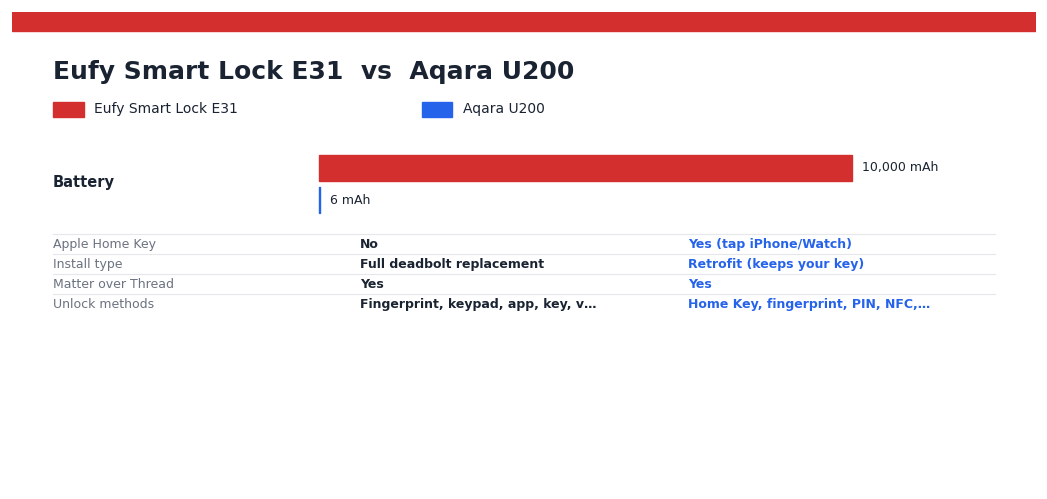
| Feature | Eufy Smart Lock E31 | Aqara Smart Lock U200 |
|---|---|---|
| Apple Home Key | No | Yes (tap iPhone/Watch) |
| Install type | Full deadbolt replacement | Retrofit (keeps your key) |
| Matter over Thread | Yes | Yes |
| Unlock methods | Fingerprint, keypad, app, key, voice | Home Key, fingerprint, PIN, NFC, app, key |
| Fingerprint capacity | Up to 50 prints, 100 codes | 50 users (5 prints / 2 PIN / 2 NFC each) |
| Hub for core smarts | None (built-in Wi-Fi) | None for app; Thread hub needed for Home Key |
| Battery | 10,000mAh, ~14 months | Lock ~6 months + keypad 4× AAA |
| Best for | Homeowners wanting simplicity + endurance | Apple households + renters |
| Typical price | ~$180 (drops to ~$140 on sale) | ~$180 list, often ~$90–$130 on sale (keypad included) |
| Subscription | None | None |
Check Eufy E31 price » | Check Aqara U200 price »
The verdict: which should you buy?
Buy the Aqara U200 if… you’re an iPhone household and want Apple Home Key tap-to-unlock (this is the one that has it); you rent, or want to keep your existing deadbolt and key; you want the most unlock methods and the finest user management; and you either already own a HomePod/Apple TV/Thread hub or don’t mind buying a hub kit. It’s the more future-proof, more flexible lock — with the honest caveat that owners report occasional app state-reporting and auto-lock quirks, and you’ll charge it more often. Get the Aqara U200 on Amazon.
Buy the Eufy E31 if… you own your home and want the simplest possible setup — one clean deadbolt, fingerprint built in, working off your Wi-Fi with no hub required; you value battery life above all (14 months vs. 6 is a real quality-of-life difference); you want the best price, especially on sale; and you do not need Apple Home Key. It’s the lower-maintenance, better-value pick for non-Apple-obsessed households. Get the Eufy E31 on Amazon.
My bottom line: for the 2026 Apple-centric buyer, the Aqara U200 is the answer — Home Key is the feature people fall in love with, and the Eufy simply doesn’t have it. For everyone else — Android households, homeowners, battery-life pragmatists — the Eufy E31 is the easier lock to live with and the better deal. Match the lock to your phone and your door, not to a spec sheet.
Still weighing your options? See our full best smart locks for the front door in 2026, and if you’re building out a broader system, our complete 2026 smart home setup guide walks through hubs, Matter, and Thread — which, as you saw in Round 4, directly affects whether Home Key will even work for you.
Frequently asked questions
Does the Eufy E31 work with Apple Home Key?
No. This is the key thing to understand. The Eufy E31 works with Apple Home (HomeKit) via Matter — you can see and control it in the Home app — but it does not support Apple Home Key tap-to-unlock. If you want to tap your iPhone or Apple Watch to the lock, you need the Aqara U200, which does support Home Key.
Do I need a hub?
For the Eufy E31, no hub is needed for app control and remote access — it has built-in Wi-Fi. You’d only add a Matter hub (HomePod, Apple TV, Echo, SmartThings) to pull it into a smart-home ecosystem. For the Aqara U200, you don’t need a hub for basic Bluetooth/app use, but Apple Home Key specifically requires a Thread border router / Matter controller such as an Aqara hub, HomePod, or Apple TV.
Can I keep my existing key?
Yes with the Aqara U200 — it’s a retrofit lock that mounts over your existing deadbolt, so your current exterior hardware and physical key still work. That’s ideal for renters. With the Eufy E31 you cannot — it’s a full deadbolt replacement, so you’ll swap out your old lock and use Eufy’s new keys instead.
What smart-home platforms do they support (Matter, Alexa, Google)?
Both support Matter over Thread, which means both work with Apple Home, Google Home, Amazon Alexa, and Samsung SmartThings. The difference isn’t platform breadth — it’s that only the Aqara adds Apple Home Key on top of that Matter support.
Is there a subscription fee?
No, for both. All core features — fingerprint, codes, app control, notifications, auto-lock, and (on the Aqara) Home Key — are free with no monthly fee. Neither Eufy nor Aqara charges a subscription for these locks.
Disclosure: TheHomePicker.com is a participant in the Amazon Services LLC Associates Program, an affiliate advertising program. As an Amazon Associate we earn from qualifying purchases. This means we may earn a commission if you click a link and buy a product, at no additional cost to you. Prices and availability are accurate as of the date of publication and are subject to change. Product specifications reflect manufacturer claims and published expert and owner reviews; we have not conducted independent lab testing of these locks.
On the horizon: Ultraloq’s face + palm-vein lock is coming — read the Ultraloq Bolt Sense preview.
You May Also Like
- Best Smart Lock for Front Door 2026: 6 Locks Tested Over 4 Months
- Schlage Sense Pro vs Yale Assure Lock 2 (2026): Is the New $399 UWB Lock Worth It?
- Yale Assure Lock 2 vs Schlage Encode Plus 2026: Smart Lock Face-Off
- UWB Smart Locks Are Here (2026): Schlage Sense Pro vs Aqara U400 vs Ultraloq Bolt Mission
- Best Smart Lock for Home 2026: Top 5 Picks Tested & Reviewed
- Ultraloq Bolt Sense (2026): Face + Palm-Vein Smart Lock – Release Date, Features & the Ultraloq You Can Buy Now