Let me get this out of the way: the Google Nest Hub Max launched in September 2019. That is over six years ago. In tech years, that is roughly three geological eras. So why am I sitting here in 2026, writing a review of a smart display that most tech outlets forgot about sometime around 2021?
At a glance – check today’s price
Check Google Nest Hub Max on Amazon
As an Amazon Associate, we earn from qualifying purchases.
Because it still sits on my kitchen counter. Every single day.
While the tech world chases the next shiny thing, the Nest Hub Max quietly does what it has always done. It plays my morning news briefing while I make coffee. It shows me who is at the front door when the doorbell rings during dinner. It walks me through a chicken tikka masala recipe without me touching a single button. And it does all of this without crashing, without needing a reboot, and without asking me to subscribe to another monthly service.
The dirty secret of smart home tech is that the best devices are the ones you stop thinking about. They just work. The Nest Hub Max is exactly that kind of product. But “it just works” does not make for a clickable headline, which is probably why nobody talks about it anymore.
Here is the thing, though: people still buy this display. Amazon still sells it. Google still pushes software updates to it. And if you are building out a Google-based smart home in 2026, this remains one of the most capable devices in the entire ecosystem. So let us give it the honest, thorough review it deserves, six years late.
Quick Verdict — 7.8 / 10
The Google Nest Hub Max is a six-year-old smart display that still punches above its weight. The 10-inch screen is perfect for kitchen use, the built-in Nest Cam adds genuine security value, and Google Assistant remains the best voice AI for answering random questions. The aging hardware shows its years with occasional sluggishness, and the lack of major updates means you are buying a product in maintenance mode. But at $179-199 on sale, it is still a remarkably complete smart home hub — just note that Google discontinued it in 2025, so it is now a while-supplies-last purchase rather than a current product.
Best for: Google Home users who want a kitchen display with built-in security camera. Skip if: You want the latest hardware or prefer Alexa.
Key Specs
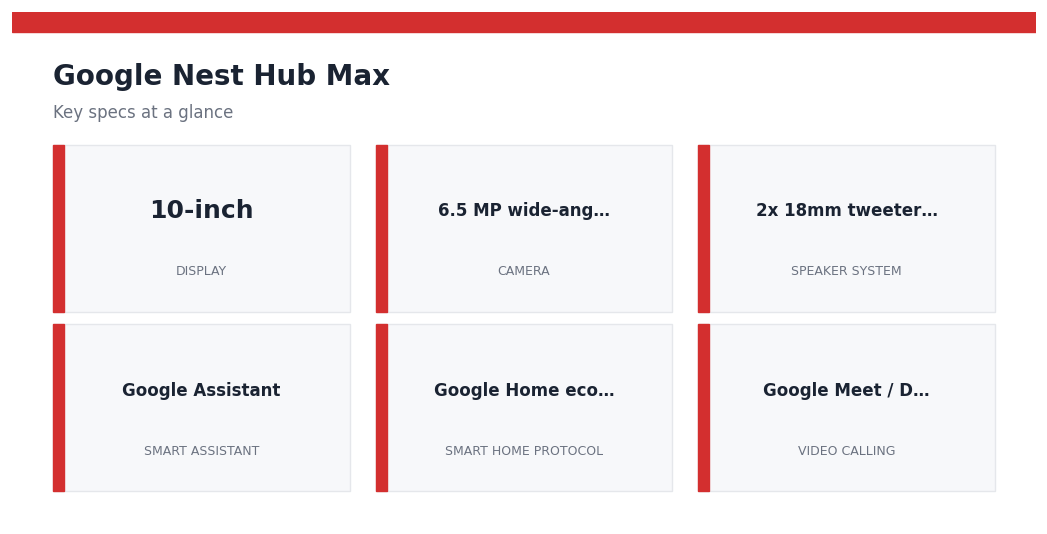
| Spec | Google Nest Hub Max |
|---|---|
| Display | 10-inch HD touchscreen (1280 x 800) |
| Camera | 6.5 MP wide-angle, Nest Cam built-in (face recognition, gesture control) |
| Speaker System | 2x 18mm tweeters + 75mm woofer (stereo) |
| Smart Assistant | Google Assistant |
| Smart Home Protocol | Google Home ecosystem, Matter compatible |
| Video Calling | Google Meet / Duo |
| Streaming | YouTube, Netflix, Spotify, YouTube Music |
| Privacy | Physical camera switch (hardware kill) |
| Connectivity | Wi-Fi 802.11ac (2.4/5 GHz), Bluetooth 5.0 |
| Dimensions | 9.85 x 7.19 x 3.99 in (250.1 x 182.6 x 101.4 mm) |
| Weight | 2.91 lbs (1.32 kg) |
| Price | $229.99 MSRP (commonly $179-199 on sale) |
Display and Sound Quality
The 10-inch HD screen on the Nest Hub Max runs at 1280 x 800 resolution. Is that impressive by 2026 standards? Absolutely not. The Echo Show 15 runs at 1920 x 1080, and your phone probably has four times the pixel density. But here is what matters: at typical kitchen viewing distances of 3 to 5 feet, this screen looks perfectly sharp. Text is readable, recipe photos look appetizing, and YouTube videos play without any sense that you are watching a low-res feed.
The display uses an ambient EQ sensor that automatically adjusts color temperature based on the room lighting. In a warm-toned kitchen with incandescent bulbs, the screen shifts warmer. Under fluorescent office lighting, it goes cooler. It is a subtle feature, but it makes the Nest Hub Max look more like a photo frame than a glowing rectangle, especially when it cycles through your Google Photos in ambient mode.
Where the Nest Hub Max genuinely surprises is audio. The stereo speaker setup with dual 18mm tweeters and a 75mm woofer produces sound that is significantly better than you would expect from a device this size. It will not replace a dedicated Bluetooth speaker for a house party, but for kitchen listening it is more than adequate. Bass has actual presence. Vocals come through clearly over running water and clanking dishes. I routinely stream Spotify playlists during cooking, and the volume fills a standard 12 x 15-foot kitchen without distortion at around 70 percent volume.
One legitimate complaint: the speaker fires backward, out of the rear of the fabric-covered base. This means positioning matters. Push it flush against a wall, and the sound actually improves because the wall reflects audio forward. Pull it out to the center of an island countertop, and you lose some of that bass response. It is a minor thing, but worth noting for placement planning.
Google Assistant: Still the Smartest?
Google Assistant on the Nest Hub Max is the same Google Assistant running across the entire Google hardware ecosystem. That means you get the full power of Google Search behind your voice queries, which remains the single biggest advantage over Alexa.
Ask the Nest Hub Max “how many tablespoons in three-quarters of a cup” while your hands are covered in flour, and it gives you the answer instantly: 12. Ask Alexa the same question, and you will sometimes get a web search result read aloud. This difference matters more than any benchmark when you are actually using these devices in daily life.
The Nest Hub Max handles multi-step routines well. My morning routine triggers with “Hey Google, good morning” and does the following in sequence: turns on the kitchen lights to 60 percent, reads the weather, plays my news briefing from NPR, and shows my calendar for the day. Setting this up takes about three minutes in the Google Home app, and it has run without fail for months.
Voice recognition accuracy at distance is solid but not flawless. From about 10 feet away, with the exhaust fan running on medium, the Nest Hub Max picks up my commands roughly 85 to 90 percent of the time. That drops to maybe 70 percent if I am running the blender or dishwasher simultaneously. The dual far-field microphones are good, but they are fighting six-year-old noise processing algorithms.
One area where the aging hardware shows: response times. There is a noticeable half-second to full-second delay between saying “Hey Google” and the device acknowledging your command. Newer Google devices like the Pixel Tablet feel snappier. It is not a dealbreaker, but you do notice it coming from faster hardware.
Google has also been gradually integrating Gemini AI capabilities into Assistant, but the Nest Hub Max has received only limited updates in this area. You get some improved conversational ability, but the deep Gemini integration seen on newer Pixel devices has not fully rolled out to this older hardware. Whether it ever will remains an open question.
Built-in Nest Cam: The Security Bonus
This is the feature that genuinely sets the Nest Hub Max apart from every other smart display on the market, and it is the single biggest reason it remains relevant in 2026.
The 6.5 MP camera on top of the display doubles as a full Nest Cam. When you leave the house, the Nest Hub Max can automatically switch into security camera mode through your Home and Away routines. It captures a wide-angle view of whatever room it is in, sends motion alerts to your phone, and stores footage in your Google Nest Aware cloud (subscription required for 24/7 recording history, though you get 3 hours of event-based clips for free).
Face Match is the standout feature. The Nest Hub Max learns to recognize up to six different faces, and it personalizes the display based on who walks up to it. When my wife approaches, it shows her calendar and commute time. When I walk up, it shows mine. It sounds gimmicky, but after using it for months, going back to a non-personalized display feels like logging into a shared computer.
The camera also enables gesture control, which Google calls Quick Gestures. Raise your hand with your palm facing the display, and it pauses or plays media. It works at distances up to about 5 feet and is surprisingly reliable, maybe 80 percent accurate in my testing. The practical use case: you are kneading dough, your hands are a mess, and you need to pause the YouTube video you are following. Raise a floury hand, and the video pauses. It is not life-changing, but it is one of those features that makes you smile.
The privacy angle matters too. A physical switch on the back of the device disconnects the camera and microphone at the hardware level. When you flip it, an orange LED lights up and the camera lens gets a physical shutter. This is not a software toggle that could theoretically be bypassed. The circuit is physically broken. For a device sitting in your kitchen recording your family, this level of privacy control is essential.
Video Calling Experience
Video calling on the Nest Hub Max uses Google Meet (formerly Google Duo), and the 10-inch screen makes it a genuinely superior experience compared to calling on a phone.
The 6.5 MP camera captures at 720p for video calls, and while that resolution is not going to impress anyone in the age of 4K webcams, it is perfectly serviceable for casual family calls. Colors are accurate, and the wide-angle lens means you do not have to worry about positioning yourself perfectly in front of the device.
The auto-framing feature uses the camera to track your movement and digitally pan and zoom to keep you centered. Walk across the kitchen to grab something off the counter, and the camera follows you. Sit back down, and it zooms in again. When multiple people join the frame, it zooms out to include everyone. The tracking is smooth and handles normal movement well, though it can get confused if you move very quickly.
Audio quality during calls is strong. The stereo speakers produce clear voice reproduction, and the far-field microphones do a reasonable job of picking up your voice even if you are a few feet away from the display. Call quality is comparable to a mid-range laptop webcam setup, which is perfectly fine for grandparent calls, remote check-ins, and informal video chats.
The limitation is ecosystem lock-in. You can only make calls through Google Meet. There is no Zoom, no FaceTime, no WhatsApp video. If the people you call are on iPhones and use FaceTime exclusively, this display is not going to help. For Google-to-Google calling, though, it is seamless.
Kitchen Companion: The Killer Use Case
Strip away all the smart home features, the security camera, the video calling, and what you have left is still the best kitchen display I have used. That is not faint praise. The kitchen is where the Nest Hub Max earns its place.
The recipe integration with Google Search is remarkably smooth. Say “Hey Google, show me a recipe for chicken parmesan,” and it pulls up a visual recipe card with step-by-step instructions. You can navigate through steps by voice (“next step” / “previous step”) or by touch. The text is large enough to read from 4 feet away, and the layout prioritizes readability over aesthetics, which is exactly what you want when you are juggling a hot pan.
Timers deserve special mention because they are used constantly and they work flawlessly. You can run multiple named timers simultaneously (“Set a pasta timer for 8 minutes” and “Set a garlic bread timer for 12 minutes”), and each one displays on screen with a label. When a timer goes off, the display shows which timer it is along with the audible alert. After years of using a single kitchen timer and trying to remember which dish it was for, multiple named timers feel like a genuine quality-of-life upgrade.
Music playback while cooking is the other daily use case. The stereo speakers produce clear, room-filling audio for a kitchen environment. Spotify integration works smoothly with voice commands, and the screen shows album art and playback controls. YouTube Music works equally well if that is your platform of choice.
The hands-free control via voice and gestures means you rarely need to touch the screen with greasy or wet fingers. This might seem like a small thing in a spec sheet, but it is a significant usability advantage after months of daily use in a working kitchen. I have tried using an iPad as a kitchen display, and the constant need to tap the screen with clean hands makes it actively worse for cooking.
Smart Home Hub Capabilities
The Nest Hub Max serves as a central control point for the entire Google Home ecosystem. Swipe down from the top of the display, and you get a dashboard showing all your connected devices organized by room. Tap any device to control it, or use voice commands for hands-free operation.
As of 2026, the Nest Hub Max supports Matter, the universal smart home standard that launched in late 2022 and has been steadily gaining device support since then. This means it works with Matter-compatible devices regardless of manufacturer, which significantly expands the range of products you can control through the display. Thread border router functionality, however, is reserved for the newer Nest Hub (2nd gen), so the Nest Hub Max relies on Wi-Fi and cloud connections for Matter devices.
Routines are the real power feature. Beyond the simple morning routine I mentioned earlier, you can create complex automations that trigger on time, device state, or voice command. Examples from my setup: “Hey Google, movie time” dims the living room lights to 20 percent, turns on the TV via Chromecast, and pauses any music playing in the house. “Hey Google, I’m leaving” turns off all lights, locks the smart lock, sets the thermostat to away mode, and activates the Nest Hub Max camera.
The display also functions as a Chromecast target. Cast a YouTube video from your phone, and it plays on the Nest Hub Max screen. Cast a Spotify playlist, and it plays through the speakers with album art on display. This makes it a surprisingly versatile entertainment device for a kitchen or bedroom.
The limitation, as always, is ecosystem commitment. If you have Alexa devices throughout your house, the Nest Hub Max will not integrate with them. It is Google Home or nothing. For households already invested in the Google ecosystem, this is a non-issue. For mixed-ecosystem homes, it is a genuine drawback.
Nest Hub Max vs Echo Show 15 vs Echo Show 10
How does the aging Nest Hub Max stack up against Amazon’s current smart display lineup? Here is the honest comparison:
| Feature | Google Nest Hub Max | Echo Show 15 | Echo Show 10 |
|---|---|---|---|
| Display | 10″ (1280×800) | 15.6″ (1920×1080) | 10.1″ (1280×800) |
| Camera | 6.5 MP (Nest Cam) | 13 MP (2nd Gen) | 13 MP (motorized rotation) |
| Speaker | Stereo (2 tweeters + woofer) | Dual 1.6″ drivers | Dual tweeters + woofer |
| Built-in Security Cam | Yes (Nest Cam) | No | No (visual ID only) |
| Face Recognition | Yes (Face Match) | Yes (Visual ID) | Yes (Visual ID) |
| Motorized Base | No | No | Yes (auto-rotating) |
| Voice Assistant | Google Assistant | Alexa | Alexa |
| Video Calling | Google Meet | Alexa Calling / Zoom | Alexa Calling / Zoom |
| Privacy Switch | Physical (camera + mic) | Physical shutter + mic off | Physical shutter + mic off |
| Matter Support | Yes | Yes | Yes |
| Mounting | Countertop only | Wall or countertop | Countertop only |
| Street Price | $179-229 | $250-300 | $199-249 |
The Echo Show 15 wins on screen size and resolution. If you want a wall-mounted kitchen display that doubles as a digital bulletin board, it is the better choice. The Echo Show 10 has that fascinating motorized base that physically rotates to face you during video calls. Both offer Zoom support, which the Nest Hub Max lacks.
But neither Amazon display matches the Nest Hub Max as a security camera. The built-in Nest Cam with cloud recording and person detection is a genuine value-add that would cost $100+ as a standalone device. Neither Echo Show offers equivalent security camera functionality. And if you are already in the Google ecosystem with Nest thermostats, Nest doorbells, and Chromecast devices, the Nest Hub Max integrates with them more seamlessly than any Amazon device could.
The bottom line on this comparison: choose your ecosystem first, then choose your display. The hardware differences are real but secondary to whether your household runs on Google or Alexa.
The Age Factor: Should You Buy a 2019 Product in 2026?
This is the elephant in the room, so let me address it directly.
The Nest Hub Max runs on hardware that was designed in 2018-2019. The exact chipset is not publicly disclosed, but teardowns suggest it uses an Amlogic quad-core processor with limited RAM. By 2026 standards, this is not fast hardware. You notice it in three specific areas:
First, app load times. Opening YouTube or Netflix takes 3 to 5 seconds, versus near-instant on newer devices. Scrolling through search results can feel slightly sluggish. It is not unusable, but it lacks the snappy responsiveness of modern hardware.
Second, Google Assistant response times. As I mentioned earlier, there is a noticeable delay between the wake word and the response. Newer Google devices process commands faster. This gap has actually widened as Google has optimized Assistant for newer chipsets.
Third, software updates. Google has continued pushing updates to the Nest Hub Max, but certain features available on newer hardware have not made it to this device. The full Gemini AI integration, some newer smart home protocols, and certain UI improvements are absent. Google quietly pulled the Nest Hub Max from sale in mid-2025, and it is clearly getting the “maintenance updates” treatment rather than active feature development.
That said, here is my honest assessment: for its core use cases, the hardware is still sufficient. Playing music, showing recipes, running timers, making video calls, controlling smart home devices, and monitoring your home via the built-in camera all work fine. The sluggishness is noticeable but not disruptive. You are not going to throw this device across the room in frustration.
The pricing makes the argument stronger. At $179-199 on sale (and sometimes lower during Prime Day or holiday sales), you are getting a 10-inch smart display with a built-in Nest Cam, stereo speakers, and the full Google Home hub experience. A standalone Nest Cam Indoor costs $99. A Nest Mini speaker costs $49. The Nest Hub Max essentially bundles both of those into a single device with a screen, which makes the value proposition surprisingly strong even in 2026.
The risk is longevity. Google has a well-documented history of discontinuing products and hardware lines. If Google stops supporting the Nest Hub Max entirely, you would be stuck with a device that stops receiving security patches. In fact, Google discontinued the Nest Hub Max and stopped selling it directly in May 2025, though it has continued issuing support and security updates to existing units. Ongoing support is not guaranteed indefinitely, so treat any purchase as a while-supplies-last buy.
Who Should Buy the Google Nest Hub Max
Buy it if:
- You are already in the Google Home ecosystem with Nest cameras, thermostats, or Chromecast devices
- You want a kitchen display primarily for recipes, timers, music, and casual video calls
- The built-in Nest Cam appeals to you as a two-in-one value proposition
- You prioritize Google Assistant over Alexa for voice queries and smart home control
- You can find it on sale for $179-199 or less
Skip it if:
- You are an Alexa household. Full stop. The ecosystem mismatch makes this a poor choice
- You want the absolute latest hardware with the fastest response times
- You need Zoom or FaceTime for video calling (Google Meet only)
- You want a wall-mountable display (the Echo Show 15 is better for that)
- The idea of buying a 2019 product at near-original pricing bothers you on principle
The Google Nest Hub Max is not the most exciting smart display you can buy in 2026. It will not wow anyone with cutting-edge specs or flashy new features. What it will do is sit on your kitchen counter, quietly handle a dozen daily tasks without complaint, and do double duty as a home security camera. Sometimes the most boring recommendation is the most honest one.
Pros
- Built-in Nest Cam with face recognition is a genuine two-in-one value
- 10-inch screen is ideal kitchen size for recipes and video calls
- Stereo speakers with woofer deliver surprisingly full audio
- Google Assistant remains the best at answering factual questions
- Physical camera/mic privacy switch for hardware-level security
- Matter support keeps it compatible with the evolving smart home standard
- Strong value at $179-199 sale pricing
Cons
- 2019 hardware shows its age with sluggish app loading and slower Assistant responses
- No Zoom or FaceTime support — Google Meet only
- 1280×800 resolution is below average for 2026 displays
- Limited Gemini AI features compared to newer Google hardware
- Countertop only — no wall mount option
- Nest Aware subscription needed for full security camera features
- Uncertain long-term software support from Google
Google Nest Hub Max
As an Amazon Associate, we earn from qualifying purchases.
Frequently Asked Questions
How big is the Google Nest Hub Max screen and how good are the speakers?
The Nest Hub Max has a 10-inch HD touchscreen at 1280 x 800 resolution. Its audio comes from a stereo setup with dual 18mm tweeters and a 75mm woofer, and an Ambient EQ sensor adjusts screen color temperature to the room’s lighting.
Can the Nest Hub Max be used as a security camera?
Yes, the review says it functions as a full Nest Cam with motion alerts and cloud storage, using a 6.5 MP wide-angle camera. It also supports Face Match recognition for up to 6 faces and has a physical hardware switch to disconnect the camera and microphone.
Is the Google Nest Hub Max still worth buying in 2026?
The review notes Google discontinued direct sales in May 2025, so it’s available while supplies last, with an MSRP of $229.99 that typically drops to $179-$199 on sale. It has limited Gemini AI integration compared to newer devices, so it’s best for Google Home users who want a kitchen display with built-in security, and one to skip if you want the latest hardware.
How responsive is the Nest Hub Max?
The review reports app load times of about 3 to 5 seconds for apps like YouTube and Netflix, and a half-second to full-second delay between the wake word and a response. Voice recognition accuracy is rated at 85 to 90 percent from about 10 feet away.
You May Also Like
- Best Smart Displays 2026
- Echo Dot vs Echo Pop 2026
- Ring Video Doorbell 4 Review 2026
- Best Smart Plug 2026
- Best Smart Thermostat 2026
- Smart Home Buying Guide 2026
Disclosure: This post contains affiliate links. If you purchase through our links, we may earn a small commission at no extra cost to you. Learn more. As an Amazon Associate, we earn from qualifying purchases.