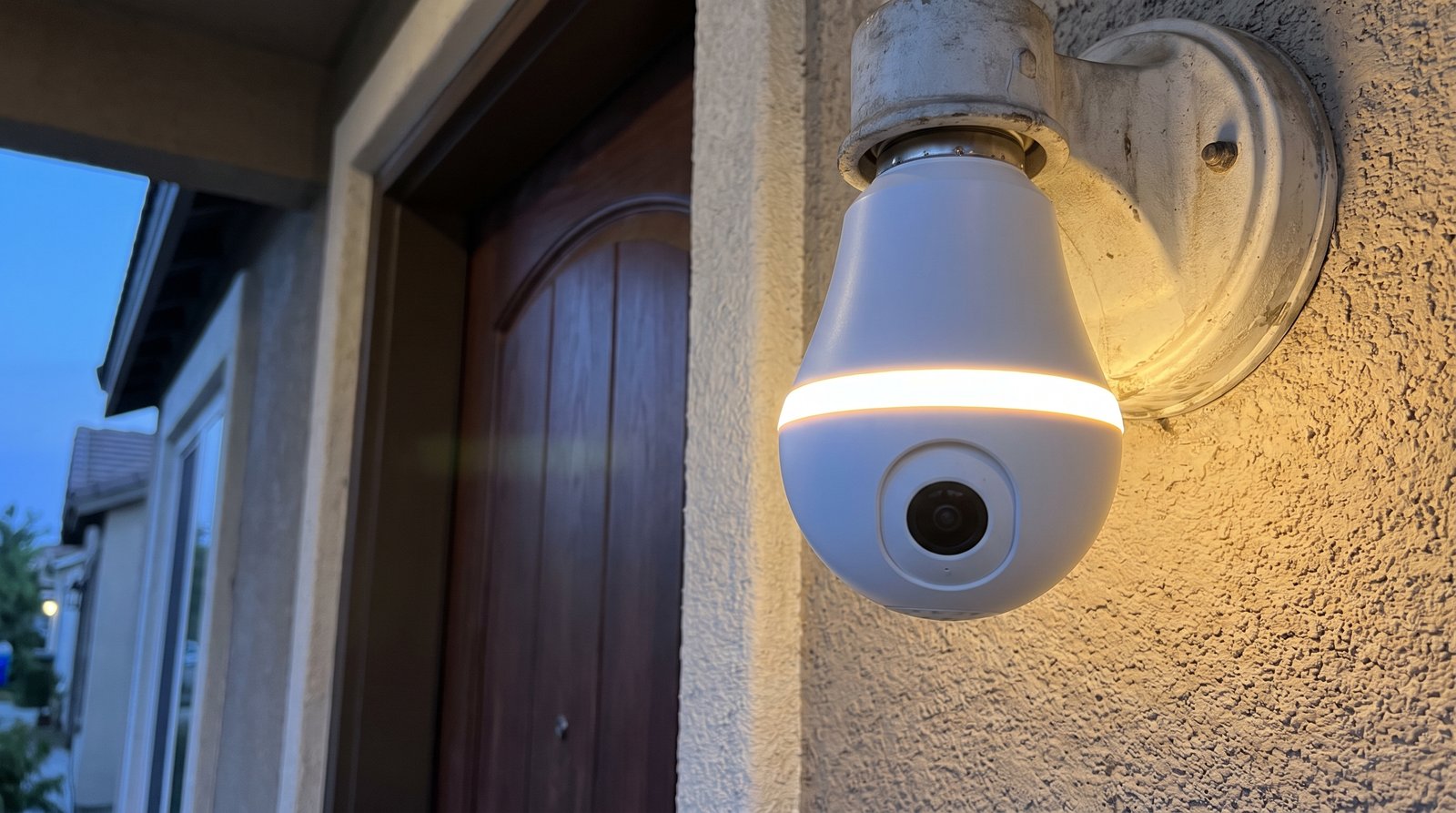
Wyze lists three things in the Bulb Cam box: the camera, a quick start guide, and a sticker that says “Do Not Turn OFF.”
As an Amazon Associate, we earn from qualifying purchases.
Sit with that for a second. That sticker is Wyze admitting, in the plainest way it can, where a camera that lives in a light socket is weakest. Your porch light has a wall switch. Somebody’s going to flip it on the way to bed, usually on the one night it matters. Wyze’s fix is adhesive paper, and honestly, we respect the candor.
It’s also the right way to think about this whole product. The Bulb Cam is a 2K camera built into an 800-lumen bulb that screws into a standard E26 socket, and at $49.98 on Wyze’s own site it puts a real camera on the outside of your house with no wiring job: swap the bulb, then run setup in the Wyze app. It also has a short list of homes it flatly won’t work in. Between Wyze’s pages and its Amazon listing, every one is written down. Here they are in one place.
TL;DR — Is a $49.98 Light Bulb Really a Security Camera?
- Yes, and a fairly complete one. The Wyze Bulb Cam shoots 2K (2304 x 1296), puts out 800 lumens, and adds a siren rated 95 dB at 4 in, two-way audio and an IP65-rated camera. Wyze sells it for $49.98.
- No subscription to record. It records 24/7 to a microSD card up to 256 GB, and the card is sold separately. Cam Plus at $2.99/mo adds cloud history and AI alerts on top.
- The catch: it aims by hand only. You get 360° of pan and 90° of tilt, but the app can’t move it. Re-aiming means a ladder.
- Deal-breakers: a fully enclosed fixture, a dimmer or timer on the circuit, or a 5 GHz-only network. And measure first: past 7.87 in (20 cm) of sconce depth, Wyze itself steers you to a different setup.
2K video and a siren that screw into a porch light for $49.98
Check the Wyze Bulb Cam on Amazon
As an Amazon Associate, we earn from qualifying purchases.
A Light Bulb That Weighs Almost a Pound
Start with the object itself, because it’s stranger than the photos suggest. It’s 9.45 inches long with the camera extended and 8.27 retracted, and it weighs 0.84 lb. That’s a heavy bulb, and Wyze knows it: the Quick Start Guide warns that the extra weight can make a free-standing lamp unstable. Don’t put it in a floor lamp and walk away.
The camera end shoots 2K, and its field of view is where Wyze argues with itself. The tech spec sheet says 166° diagonal, while the marketing copy and Wyze’s own comparison chart say 160°. We’ll quote both and let Wyze sort it out. Night vision comes in both color and infrared. Hold on to that 2K, too: of the two other light cameras in Wyze’s own comparison chart, only one matches it.
The bulb end is simpler, and stubborn. It’s 800 lumens at 3000K, and Wyze says that color temperature is fixed and “cannot be changed.” Warm light, full stop, even if every other fixture on the wall runs cold. You can dim it in the app, and an Ambient Light mode keeps a low glow going until something moves, then brightens. It also only speaks 2.4 GHz Wi-Fi, which Wyze’s FAQ states flatly. If your home network is 5 GHz-only, sort that out before the box shows up.
It Aims By Hand, Not By App
It’s natural to assume a bulb camera points wherever the socket happens to aim it. This one doesn’t. The camera hangs off a telescopic rod with 1.18 in (3 cm) of travel, and Wyze’s instruction is to manually extend, rotate and tilt it until the angle’s right. The Amazon listing puts numbers on it: 360° of pan and 90° of tilt.
Now the catch hiding in the word manually. Ask whether the app can move it, and Wyze is blunt: “No, the camera position must be manually adjusted.” The Amazon listing repeats it in capital letters, noting the camera does NOT rotate remotely via the app. When a delivery driver walks out of frame, you don’t fix it from the couch. You fetch the ladder.
And here’s something we couldn’t find on any Wyze page: how far it sees. No Wyze page we found gives a motion-detection range or a night-vision range in feet. The 35-foot night-vision figure you’ll see on Amazon comes from Amazon’s product-details table, not from any Wyze page we found. If someone quotes you a motion range for this camera, ask which Wyze page it came from; we found none.
So on a porch light watching one walkway, hand-aiming is a non-issue. Aim once, forget it. On a driveway where you wanted to follow a car, it’s a reason to buy something else. Since you’ll only want to climb up there once, our home security camera placement guide is worth five minutes first.
Five Minutes With a Tape Measure Beats a Return Label
Here’s the part that decides whether it stays in your house. Every number here is published, so go measure.
- Socket: a standard E26 socket that takes A19-shape bulbs. The Bulb Cam draws 15 watts, and Wyze’s troubleshooting page asks for a socket with a power output above 15W. No E17 sockets, no integrated LED fixtures.
- Depth: under 7.87 in (20 cm) from socket base to sconce edge. Any deeper and, per Wyze, the sconce itself may block the camera’s view.
- Bottom opening: over 2.5 in. That one appears on the Amazon listing; we found it on no Wyze page.
- Clearance: the lens has to hang below the bottom edge of the fixture. Shooting through glass or the fixture housing, Wyze says, can cause reflections, poor image quality and motion-detection trouble.
- Outdoors: the camera is IP65, the bulb portion only UL Damp. Wyze says it’s fine outside, but warns that most socket adapters aren’t waterproof and need to be covered. It’s rated to operate from -4°F to 122°F, so if your winters dip below that, you’re outside Wyze’s own spec.
Sconce deeper than 20 cm? Wyze won’t even try to sell you this one. It points you to its Lamp Socket and a separate Wyze Cam instead (which Cam depends on the page; more below). When a company talks you out of its own product, listen.
Two Rules Wyze Prints in Capital Letters
The Quick Start Guide Wyze posts online prints both in shouting caps. Break either one and you’re outside what Wyze supports.
- “DO NOT use a dimmer switch or timer for this product.” The guide adds that it won’t operate properly on a standard incandescent dimmer, and Wyze’s won’t-power-on troubleshooting tells dimmer owners to move it to another socket.
- “DO NOT use in totally enclosed luminaires.” If the bulb would sit inside a sealed glass globe, this isn’t your camera.
Which brings us back to the sticker. The Bulb Cam’s only listed power source is the socket, and there’s no battery or backup anywhere in its specs. Wyze’s own troubleshooting steps make the point for us: to power-cycle the camera, they tell you to turn the socket off at the light switch for 10 seconds, then back on. The wall switch doesn’t just kill the light. It kills the camera. This camera needs a circuit that stays live, which in real life means a switch everyone in the house leaves alone.
Recording Costs You a microSD Card, Not a Subscription
Here’s the strongest argument for this camera: it doesn’t need a monthly plan to record. Wyze’s product page says it’ll record 24/7 to a microSD card up to 256 GB, and the card is sold separately. In the camera’s settings, turn on Record to MicroSD Card and pick Continuous. Card tip: Wyze takes 8, 16 or 32 GB cards in FAT32, and up to 256 GB in exFAT.
There’s one condition, and it’s the sticker again. Continuous recording to the card only runs while the wall switch stays on, because the switch is the camera’s power. Plan against the one night somebody flips it.
What Cam Plus adds, according to the Bulb Cam’s own product page, is AI alerts and cloud backup. It’s $2.99/mo per camera with a 30-day free trial on new plans, and that buys 14 days of cloud video plus person, pet, vehicle and package detection. On a porch light watching your front step, package detection is the part most likely to earn the $2.99. You don’t need any of it to record.
Fixture with more than one socket? The Bulb Cam can sync the lighting of up to 5 Wyze Accessory Bulbs ($16.98 for one, $36.99 for three), so the other sockets follow the Bulb Cam’s brightness, schedules and motion-activated lighting instead of sitting at one fixed level.
If the Bulb Cam Won’t Fit: Wyze’s Own Alternatives, Plus One of Ours
Wyze publishes a comparison chart comparing the Bulb Cam with its other light-based cameras. Here are its numbers, trimmed to the rows that change a purchase:
| Wyze Bulb Cam | Wyze Floodlight v2 | Wyze Lamp Socket | |
|---|---|---|---|
| Goes into | E26 socket | Junction box | E26 socket |
| Light | Up to 800 lm, 3000K | Up to 2800 lm, 5000K | Up to 2000 lm |
| Resolution | 2K HD | 2K HD | 1080p |
| Field of view | 160° | 160° | 130° |
| Siren at 4 in | 95 dB | 105 dB | 80 dB |
| Outdoor rating | IP65, UL Damp | IP65 | UL Damp |
| Swap it in like a bulb? | Yes ✅ | No, needs wiring | Yes ✅ |
You need real light: Wyze Floodlight v2
Same 2K resolution, three and a half times the light at 2800 lumens, a colder 5000K and a siren rated 105 dB at 4 in. The price of all that is installation. It wires to a junction box, so a bulb swap turns into an electrical job. If your complaint would be “not bright enough for the driveway,” this is the answer.
Your sconce is too deep: the Wyze Lamp Socket route
This is Wyze’s own pick for sconces deeper than 20 cm, and it’s where Wyze’s pages disagree again. The Bulb Cam product page pairs the Lamp Socket with a Wyze Cam v4; the support article on large fixtures says a Cam v3. The comparison chart names no camera at all. Its Lamp Socket column reads 1080p, a narrower 130° view and an 80 dB siren, so treat those as the Lamp Socket setup in Wyze’s chart, not a spec for either Cam, and confirm which camera you’re pairing before you order both halves.
You want to aim it from your phone: Wyze Cam Pan v3 (our pick, not Wyze’s)
If hand-aiming is the dealbreaker, here’s our suggestion. Wyze’s Bulb Cam pages don’t point you to this one; it isn’t in the comparison chart, and it isn’t a light. But it solves the aiming problem. Wyze says the Pan v3 spins 360° and tilts 180° remotely, and sells it as a 1080p camera with night vision at a regular $44.98. Read that resolution twice, though. It’s a step down from 2K, and it runs off a USB cable and power adapter, so it needs an outlet and somewhere to live. We went through its spec sheet in our Wyze Cam Pan v3 review.
Right fixture, right switch? This is the one that screws in like a bulb
Check the Wyze Bulb Cam on Amazon
As an Amazon Associate, we earn from qualifying purchases.
The Verdict: A Lot of Camera for $49.98, If Your Fixture Cooperates
Buy it if you’ve got an open E26 socket, a shallow sconce with room underneath, a dimmer-free circuit that can stay on, 2.4 GHz Wi-Fi, and a spot where 800 lumens of warm light is enough. For $49.98 you get 2K video, 24/7 recording to a microSD card (sold separately) with no subscription, a siren, two-way talk and a 1-year warranty. In Wyze’s own chart, the only sibling that matches its 2K is the Floodlight v2, and that one wants a junction box, which is a different kind of Saturday.
Skip it if any of the deal-breakers above describe your house, if you need to re-aim from your phone, or if you’re trying to cover more than one approach with one camera. For that job, our best outdoor security cameras roundup is a better place to start.
Aim it once, aim it well, leave the switch alone, and it earns its $49.98. Ask it to be a floodlight or a pan-tilt cam and it’ll disappoint you in exactly the ways Wyze’s own chart and FAQ already spell out.
Wyze Bulb Cam FAQ
Can you pan and tilt the Wyze Bulb Cam from the app?
No. Wyze says the camera position has to be adjusted by hand. The Amazon listing gives 360° of pan and 90° of tilt, and Wyze lists 1.18 in (3 cm) of telescoping travel on the rod.
Does the Wyze Bulb Cam need a subscription?
Not to record. It records 24/7 to a microSD card up to 256 GB, sold separately, with no subscription. Cam Plus is $2.99/mo per camera and adds 14 days of cloud recordings plus person, pet, vehicle and package detection. Either way, recording only runs while the wall switch stays on.
Will it fit a fully enclosed porch light?
No. Wyze says it isn’t compatible with fully enclosed fixtures, E17 sockets or integrated LED lights. For open fixtures, Wyze says it fits most sconces under 7.87 in (20 cm) deep; deeper ones may block the camera’s view. The lens has to hang below the fixture’s bottom edge.
Can I use it on a dimmer switch?
No. The Quick Start Guide says “DO NOT use a dimmer switch or timer for this product.” You can still dim the light itself from the Wyze app, up to 800 lumens, and its Ambient Light mode stays low until motion is detected.
How far can it see at night?
Not on any Wyze page we found. Its spec sheet lists color night vision and four infrared LEDs, but no distance. The 35 feet in Amazon’s product-details table isn’t on any Wyze page we checked, and we found no Wyze page that gives a motion-detection range.
Disclosure: As an Amazon Associate, The Home Picker earns from qualifying purchases. Specs and quotes: Wyze’s product page, Tech Specs (updated June 05, 2025), Quick Start Guide, Comparison Chart (updated May 23, 2025), support articles and Cam Plus page, plus the Amazon listing, checked September 18, 2026. Prices are Wyze’s own; Amazon’s move.