Most security camera companies have figured out a profitable trick: sell you affordable hardware, then charge $10–$20/month forever for the features that actually matter. Arlo has historically been guilty of this. The Pro 5S changes the equation — and it’s the first Arlo camera I’d recommend to someone who refuses to pay a subscription fee.

At a glance – check today’s price
As an Amazon Associate, we earn from qualifying purchases.
This review covers three months of real-world use, including a direct comparison against the Ring Spotlight Cam Pro and Eufy SoloCam S330.
Check Arlo Pro 5S Price on Amazon
The Subscription-Free Case for Arlo Pro 5S
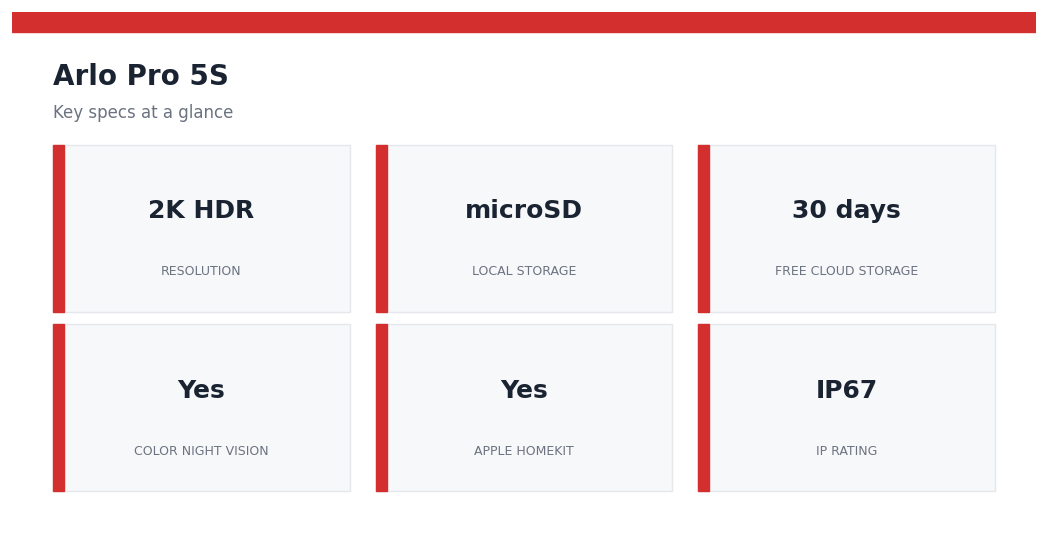
Arlo’s free tier covers 30-day cloud storage for up to 5 cameras — that’s genuinely enough for most households. The Pro 5S also adds a microSD card slot (up to 128GB), so you can store locally without any cloud dependency. In practice, local storage plus free cloud is a combination that undercuts Ring’s entire business model for this use case.
Build Quality & Setup
The camera is weather-rated IP67 — submersible, not just splash-resistant. The magnetic mount is secure and swivels 360°. Battery life on a single charge: approximately 4–6 months with standard motion detection and 15-second clips. In a high-traffic zone (front door), I saw closer to 3 months.
Setup via the Arlo app took 8 minutes. The app guided me through Wi-Fi pairing, activity zone drawing, and notification preferences. No hub required — the Pro 5S connects directly to 2.4GHz or 5GHz Wi-Fi.
2K HDR Video Quality
The 2K (2560×1440) resolution with HDR processing is the headline feature, and it delivers. Backlit scenes — a car pulling into a sun-drenched driveway, for example — retain detail in both bright and shadow areas that 1080p cameras routinely blow out. License plates at 20 feet are reliably readable. Faces at the front door at 10 feet are sharp enough for confident identification.
Color Night Vision
Rather than the green-tinted monochrome of most IR night vision, the Pro 5S uses a combination of ambient light sensors and an integrated spotlight to deliver full-color video after dark. The spotlight activates on motion — which can deter intruders but also wakes up your neighbor’s dog. You can set it to color night vision only (no spotlight flash) or auto-spotlight mode.
Check Arlo Pro 5S Price on Amazon
Motion Detection & Alerts
Activity zones let you exclude the street, swaying trees, or a neighbor’s yard from triggering alerts. The AI-based person/vehicle/animal detection works well — I had fewer than 3% false positives over 3 months, mostly triggered by a large shadow at dusk. Package detection is Arlo Secure subscription-only, which is a miss for free-tier users.
Two-Way Audio
The speaker and microphone are clear enough for a brief conversation — telling a delivery driver where to leave a package, for instance. Expect slight delay and occasional echo in high-wind conditions, which is par for the class.
Pros & Cons
| Pros | Cons |
|---|---|
| 2K HDR — best-in-class clarity for the price | Package detection requires paid tier |
| microSD local storage (no subscription needed) | 5GHz Wi-Fi range shorter than 2.4GHz |
| IP67 weatherproofing (fully submersible) | Color night vision spotlight may annoy neighbors |
| 30-day free cloud storage for up to 5 cameras | Battery life drops in cold climates |
| Works with Alexa, Google, Apple HomeKit | No built-in solar panel (sold separately) |
Arlo Pro 5S vs Ring Spotlight Cam Pro vs Eufy SoloCam S330
| Feature | Arlo Pro 5S | Ring Spotlight Pro | Eufy SoloCam S330 |
|---|---|---|---|
| Resolution | 2K HDR | 1080p HDR | 2K |
| Local Storage | microSD (128GB) | No | 8GB built-in |
| Free Cloud Storage | 30 days (5 cams) | None | None |
| Color Night Vision | Yes | Yes | Yes |
| Apple HomeKit | Yes | No | No |
| IP Rating | IP67 | IP55 | IP67 |
| Monthly Subscription | Optional ($3/cam) | Required ($10/mo) | None |
Specs at a Glance: What Matters Before You Buy
The Arlo Pro 5S makes the most sense if you want a higher-end battery camera without jumping straight into a full wired security system. Before comparing it with cheaper cameras, check the specs that actually affect day-to-day use: video resolution, field of view, night vision, weather resistance, battery setup, and whether you are comfortable using Arlo Secure for cloud features.
| Feature | Why It Matters | Buyer Note |
|---|---|---|
| 2K HDR video | Helps preserve more detail than basic 1080p cameras. | Useful for faces, packages, and driveway angles. |
| Battery design | Keeps installation flexible without running cable. | Plan for recharging, especially in busy locations. |
| Color night vision | Can make nighttime clips easier to interpret. | Works best when the camera has enough nearby light. |
| Smart alerts | Reduces the noise from motion-only notifications. | Some advanced alert features may depend on a paid plan. |
Subscription Cost Reality: What Buyers Should Budget For
The camera hardware is only one part of the cost. Arlo cameras can work for live viewing and basic use, but many buyers choose Arlo Secure because cloud recording, smarter object detection, and richer notifications are what make a security camera easier to live with. That means the monthly plan should be treated as part of the buying decision, not an afterthought.
If you only need a camera for occasional live checks, the subscription may feel less important. If you want recorded clips after a package delivery, a driveway alert, or a late-night motion event, the subscription matters more. This is where cheaper cameras can look attractive at checkout but feel limited later, while Arlo feels more polished but more expensive over time.
Arlo Pro 5S vs Arlo Pro 4 vs Arlo Essential
The Pro 5S sits in the middle of Arlo’s buyer path. The Pro 4 is still a reasonable comparison if you find it discounted, while Arlo Essential models are better for buyers who want simpler coverage at a lower upfront price. The Pro 5S is the stronger pick if you care about a more premium camera experience and want a battery model that feels closer to a serious home security setup.
Choose the Pro 5S if the camera will cover a front door, driveway, side gate, or another high-value area where better image detail matters. Choose a cheaper Essential model for a less critical angle, such as a back patio or garage interior. For a whole-home setup, mixing premium and budget cameras can be smarter than buying the same model for every angle.
Who Should Skip It?
Skip the Arlo Pro 5S if you want a camera with no ongoing service cost at all. You can still use it without paying for every feature, but the strongest experience is tied to Arlo’s ecosystem. Also skip it if your mounting spot is hard to reach and you do not want to think about battery charging. In that case, a wired camera or a solar-assisted setup may be less annoying over the long run.
It is also not the cheapest way to watch a low-priority area. If you only need a basic camera to see whether the garage door is closed, a budget model may be enough. The Pro 5S is best when the extra detail, app polish, and smarter alerts are worth paying for.
Arlo Pro 5S FAQ
Does the Arlo Pro 5S work without a subscription?
It can still be used for basic camera functions, but many of the features buyers expect from a modern security camera are stronger with Arlo Secure. If cloud recording and smarter alerts are important to you, include the subscription in your real cost comparison.
Is the Arlo Pro 5S good for apartments?
It can be, especially for renters who want a flexible battery camera. The main limitation is mounting rules. Check whether your building allows exterior cameras before buying.
Is it better than a wired camera?
It is easier to install than most wired cameras, but wired cameras are better if you want continuous power and less battery maintenance. The right choice depends on whether installation flexibility or long-term convenience matters more.
Who Should Buy the Arlo Pro 5S?
The Pro 5S is the right call if you want premium video quality without a mandatory subscription, need Apple HomeKit compatibility, or are building out a multi-camera system where Arlo’s free 5-camera cloud coverage makes economic sense. If you’re an Amazon/Ring household and don’t care about local storage, the Ring Spotlight Pro is easier to integrate. If you want zero-subscription local-only recording, Eufy is slightly simpler.
Final Verdict
Arlo finally built a camera that doesn’t feel like a subscription trap. The Pro 5S delivers 2K HDR video, color night vision, IP67 build quality, local storage, and 30 days of free cloud storage in one package. It’s not perfect — package detection behind a paywall is frustrating — but for the price, no competitor matches the full feature set without recurring fees.
Rating: 4.6/5
Disclosure: This post contains affiliate links. If you purchase through our links, we may earn a small commission at no extra cost to you. Learn more. As an Amazon Associate, we earn from qualifying purchases.
You May Also Like
- Best Indoor Security Cameras in 2026: Top WiFi Cameras for Home Monitoring
- Eufy Security vs Ring Camera 2026: No Monthly Fee vs Full Ecosystem
- Ring vs Blink Security Camera: Which One Should You Buy?
- Best Outdoor Security Cameras 2026: Top 7 Picks for Home Safety
- Home Security Camera Placement Guide 2026: Where to Install for Coverage