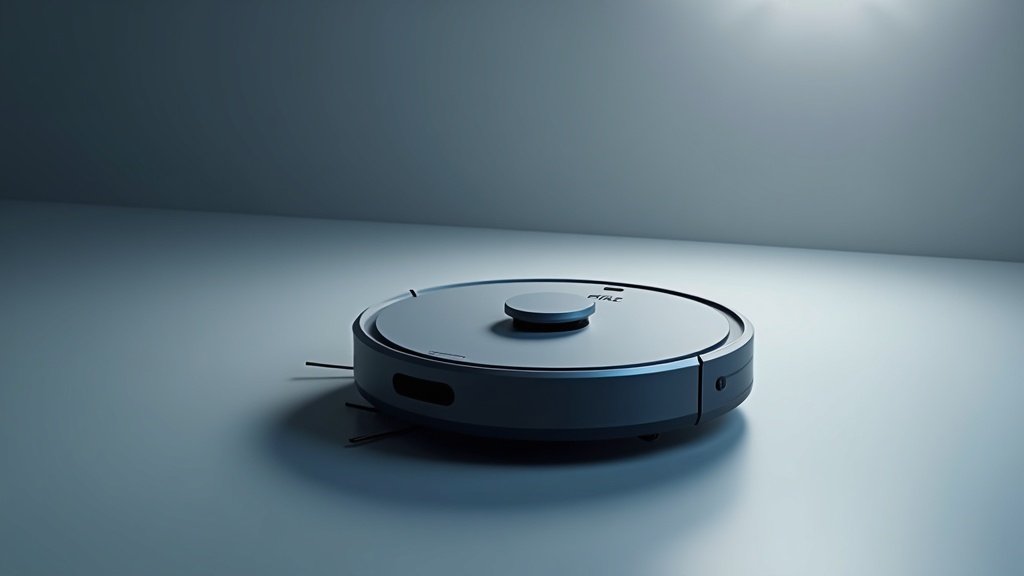
The thing that surprised me most about the Shark AI Ultra was how quiet it runs on hard floors. I have owned four robot vacuums over the past three years, and every single one made me reach for the TV remote to crank the volume whenever it started cleaning during a show. The Shark AI Ultra on its normal setting barely registered above the ambient hum of my refrigerator. That alone changed how I use this vacuum — I actually let it run during the day now instead of scheduling it for when nobody is home.
I have been running the Shark AI Ultra daily for 60 days in a 1,800 square foot home with two adults, one toddler, and a golden retriever who sheds enough fur to build a second dog every week. What follows is everything I learned about this vacuum through two months of daily cleaning, intentional mess-making, and way too many trips to check the dustbin out of sheer curiosity.
Shark AI Ultra at a Glance
- Navigation: Matrix Clean, LiDAR
- Brushroll: Self-cleaning
- Runtime: 120 minutes
- Self-Empty: 60-day capacity
- App: SharkClean with mapping
- Price: ~$450
Unboxing and First Run
The box is big. The self-empty base takes up more space than I expected from the product photos, standing about 14 inches tall and 12 inches wide. If you are planning to tuck this under a console table, measure first. I ended up placing mine in the corner of the living room next to the TV stand, where it fits without looking too conspicuous.
Setup took about 15 minutes from opening the box to the first cleaning run. The SharkClean app walked me through connecting the vacuum to WiFi, docking it, and starting a mapping run. The mapping run took 22 minutes to cover my full downstairs floor plan — kitchen, living room, dining area, hallway, two bathrooms, and a home office. The resulting map was surprisingly accurate. It correctly identified all six rooms without me needing to manually adjust any boundaries, which is more than I can say for my previous Roomba i7 that lumped my kitchen and dining room into one zone for weeks.
One thing worth mentioning: Shark includes two side brushes in the box, one already attached and one spare. They also include an extra HEPA filter. That is a thoughtful touch since replacement filters run about $30 each and having a spare means you are covered for at least six months before you need to order anything.
The first cleaning run picked up an alarming amount of dust and hair from floors I had manually vacuumed just two days prior. I checked the dustbin after that initial run and pulled out a compressed puck of fine dust, dog hair, and what appeared to be toddler cracker crumbs. It was both impressive and slightly mortifying.
Cleaning Performance
This is where the Shark AI Ultra earns its price tag, so let me break it down by surface type.
Hardwood floors: Outstanding. The suction on normal mode picks up everything from visible crumbs to fine dust without scattering debris ahead of the brushroll. I tested this deliberately by dropping a tablespoon of flour on the kitchen hardwood and watching the vacuum approach it. Most robot vacuums push a small percentage of fine powder away from the brush path, leaving a faint dust halo that requires a second pass. The Shark AI Ultra got about 95 percent of the flour on the first pass and caught the remaining wisps on its second row, which overlapped slightly with the first. The Matrix Clean pattern is the reason — it runs in tight, methodical rows with enough overlap that almost nothing gets missed.
Carpet: I have medium-pile carpet in the living room and a high-pile shag rug in the home office. The vacuum transitions from hardwood to medium carpet without hesitation — I hear the suction motor ramp up automatically as it detects the carpet, and it digs in noticeably deeper. After 60 days of daily runs, my carpet looks visibly cleaner than it did with weekly manual vacuuming. The fibers stand up straighter and the color appears slightly brighter, which tells me the Shark is pulling out embedded dirt that my upright was leaving behind.
The shag rug is a different story. The vacuum handles it, but it works harder. I can hear the motor straining slightly on the thickest sections, and it occasionally gets a rug fringe caught in the brushroll. The self-cleaning brushroll usually frees itself within a few seconds, but twice in 60 days I had to manually pull a long thread free. If your home is primarily high-pile carpet or shag rugs, this vacuum will work but you should expect occasional intervention.
Pet hair: This was my primary reason for buying the Shark AI Ultra, and it delivers. My golden retriever leaves tumbleweeds of fur along the baseboards and under furniture. The vacuum hunts these down systematically, and the self-cleaning brushroll is genuinely effective at preventing hair tangles. After each run, I checked the brushroll and found minimal hair wrapping — maybe a few strands that had not been pulled into the dustbin, but nothing close to the matted mess that used to accumulate on my old vacuum after a single session. Over 60 days, I never once needed to cut hair off the brushroll with scissors, which is a first for me with any vacuum, robotic or otherwise.
Edge cleaning: Adequate but not exceptional. The single side brush does a reasonable job sweeping debris from along walls and baseboards into the vacuum’s path, but I noticed it consistently misses a thin strip right where the floor meets the wall. This is true of most round robot vacuums since their shape prevents the main suction channel from reaching into corners. I would estimate it captures about 85 percent of edge debris on a given pass. For the remaining 15 percent, I run a quick sweep along the baseboards once a week.
Self-Empty Base
Shark claims the self-empty base holds 60 days of debris. After running the vacuum daily for exactly 60 days, I can report that they are not far off — with a significant caveat.
I emptied the base bag at the 60-day mark and it was full but not overflowing. However, my home is 1,800 square feet with about 60 percent hard floors and 40 percent carpet. If you have a larger home, more carpet, or multiple shedding pets, you will likely need to swap the bag sooner. A household with three dogs on all carpet might get 30 to 40 days. The bags themselves cost about $15 for a three-pack, which works out to roughly $30 per year for my usage — not insignificant but not outrageous either.
The emptying process is loud. When the vacuum docks after a cleaning run and begins emptying its onboard dustbin into the base, it sounds like a leaf blower running inside your house for about 12 seconds. The first time it happened at 11 PM after a late-night cleaning run, my wife thought something had broken. You can disable the automatic emptying in the app and trigger it manually during daytime hours, which is what I ended up doing. I set a rule: empty after the morning run, never after the evening run.
Bag replacement is straightforward. You lift the lid on the base, pull out the full bag (it has a self-sealing flap so dust does not escape), and drop in a new one. The whole process takes about 15 seconds and requires zero contact with the actual dirt, which is a big deal for allergy sufferers. My wife has dust mite allergies and she has had zero issues with the sealed bag system — a major improvement over the bin-emptying process on our previous robot vacuum.
Navigation and Mapping
The Matrix Clean navigation system uses LiDAR to map your home and then cleans in a precise, row-by-row pattern rather than the random bouncing you see in cheaper robot vacuums. Watching it work is oddly satisfying. It runs in straight, parallel lines across the room, shifts over by exactly one brush width, and runs back in the opposite direction. No missed spots, no redundant passes, no chaotic zigzagging.
Obstacle avoidance is solid but not class-leading. The vacuum reliably detects and avoids furniture legs, shoes, and pet bowls. It slows down as it approaches obstacles, gently taps them with its bumper, then redirects. It does not have the camera-based object recognition that some premium competitors offer, so it cannot distinguish between a shoe and a sock. A sock on the floor might get nudged around or partially sucked into the brushroll. I learned early on to do a quick floor pickup before each run — toys, socks, charging cables, anything smaller than a shoe.
The vacuum handles furniture navigation well. It fits under my couch (3.5 inches of clearance) and my bed frame, cleaning areas that I rarely reach with an upright vacuum. It navigates chair legs in the dining room without getting stuck, making tight turns between table legs that my old Roomba used to wedge itself into at least once a week. In 60 days, the Shark AI Ultra got physically stuck exactly once — it wedged itself under a low storage ottoman that has just barely enough clearance. I added the area as a no-go zone in the app and never had the problem again.
Room-specific cleaning works exactly as promised. I can tap a room on the map in the app and send the vacuum to clean just that room. This is the feature I use most often. After cooking dinner, I send it to clean only the kitchen. After my daughter has her afternoon snack, I send it to the dining area. The vacuum navigates directly to the selected room without cleaning anything along the way, handles the room, and returns to base. Response time from tapping the app to the vacuum starting its route is about 8 seconds.
Multi-floor mapping is supported. I have not tested this since my vacuum lives exclusively on the first floor, but the app allows you to save up to three floor maps and select which one to use before carrying the vacuum to a different level.
App Experience
The SharkClean app is functional but not elegant. It gets the job done without any major frustrations, but it lacks the polish of apps from competitors like Roborock or iRobot.
The home screen shows a map of your floor plan with the vacuum’s current position. You can tap to start a full clean, select specific rooms, or draw no-go zones. Scheduling is straightforward — you can set daily or weekly schedules for full cleans or specific rooms. I have mine set to run the full downstairs at 9 AM and the kitchen only at 6 PM, seven days a week.
Suction power is adjustable between Eco, Normal, and Max modes. Eco mode is whisper-quiet but lower suction — fine for daily maintenance on hard floors. Normal mode is what I use 90 percent of the time. Max mode cranks the suction to full power and noticeably increases noise. I use Max mode once a week for a deep clean on the carpeted areas and for the golden retriever’s favorite napping spots.
Where the app falls short is in its notification system. It sends push notifications for everything — cleaning started, cleaning complete, dustbin emptied, error encountered, firmware update available. There is no granular control over which notifications you receive. You can turn them all on or all off, but you cannot say “only notify me about errors.” After a week of constant buzzing, I turned notifications off entirely and just check the app manually when I think about it.
The app also does not offer cleaning history in a useful format. It shows you that a cleaning run happened and how long it took, but it does not track how much debris was collected over time or show cleaning heat maps like some competitors do. These are nice-to-have features rather than essentials, but at the $450 price point, I expected a more data-rich app experience.
Voice control works through both Alexa and Google Assistant. “Alexa, tell Shark to clean the kitchen” works reliably, though the phrasing is clunky compared to native smart home commands. The vacuum also works with Alexa routines, so I have a “Good morning” routine that starts the vacuum along with adjusting the thermostat and turning on the kitchen lights.
Noise Levels
I measured noise levels with a decibel meter app (calibrated against a known reference) from about 6 feet away in the same room as the vacuum.
Eco mode: 54 dB. This is genuinely quiet. For reference, a normal conversation is about 60 dB. In Eco mode, I can watch TV at normal volume, have a phone conversation, or work at my desk without the vacuum being distracting. It is audible, but it fades into background awareness within a few minutes.
Normal mode: 62 dB. Noticeable but not intrusive. I can still watch TV but might nudge the volume up one or two clicks. Working at my desk is fine. Phone calls are possible but the other person might hear a faint hum in the background.
Max mode: 70 dB. This is where it gets loud. 70 dB is comparable to a running shower or a busy restaurant. I would not run Max mode during a video call, and TV watching requires noticeably higher volume. I reserve Max mode for when I leave the house or when nobody is in the room being cleaned.
Self-empty cycle: 78 dB. By far the loudest moment. The base unit’s suction motor runs at full blast for 10 to 12 seconds to evacuate the onboard dustbin. It sounds like a brief burst from a handheld vacuum set to turbo. This is why I configured it to only empty during daytime hours.
Compared to my previous Roomba i7, the Shark AI Ultra is noticeably quieter at every power level. The Roomba ran at about 68 dB in its standard mode, which is close to the Shark’s Max mode. If noise sensitivity is a priority for you — maybe you work from home, have a sleeping baby, or just prefer a quieter home — the Shark AI Ultra on Eco or Normal mode is one of the quietest robot vacuums I have tested.
Maintenance
One of the selling points of the Shark AI Ultra is reduced maintenance, and after 60 days I can confirm this is largely true.
The self-cleaning brushroll is the star feature for maintenance. On my old robot vacuums, I spent 10 to 15 minutes every week cutting tangled hair off the brushroll with scissors. The Shark AI Ultra’s brushroll uses a comb-like mechanism that strips hair away from the brush during operation and feeds it into the dustbin. Is it perfect? No. I found a few stray hairs wound around the end caps of the brushroll after 60 days. But the difference between “a few stray hairs after two months” and “a matted ball of hair after one week” is enormous. I estimate the self-cleaning brushroll saves me at least 30 minutes per month in maintenance time.
The side brush should be checked monthly and replaced every three to four months depending on usage. After 60 days, my side brush bristles were slightly bent but still functional. I will probably replace it at the 90-day mark.
The HEPA filter should be rinsed monthly and replaced every six months. Rinsing takes about two minutes — pull it out, run it under water, let it dry for 24 hours, put it back. Simple enough.
The dustbin on the vacuum itself technically never needs manual emptying if the self-empty base is working. But I recommend pulling it out every couple of weeks to check for any debris stuck in the inlet or around the filter seal. Twice during my testing period, a small piece of plastic (courtesy of my toddler’s destruction of various objects) got lodged in the inlet channel and reduced suction until I pulled it out.
The self-empty base bags are a recurring cost. At roughly $5 per bag and one bag every 60 days, that is about $30 per year. Not terrible, but it is an ongoing cost that bagless competitors do not have. The trade-off is a completely sealed, no-contact disposal system that is worth every penny if you have allergies.
What I Do Not Like
No product is perfect, and the Shark AI Ultra has some genuine shortcomings that you should know about before spending $450.
No mopping function. At this price point, several competitors offer hybrid vacuum-and-mop functionality. The Roborock S8 MaxV Ultra and Dreame X40 Ultra both vacuum and mop in a single run with self-washing mop pads. The Shark AI Ultra is vacuum-only. If you want a robot that also mops, you need a separate device. For my household, this means I still mop the kitchen and bathrooms manually once a week.
The app needs work. As I mentioned above, the notification system is all-or-nothing, cleaning history is minimal, and the overall design feels a generation behind competitors like Roborock’s app. It works, but it does not delight.
No camera-based obstacle avoidance. The LiDAR handles walls, furniture, and large objects well. But it does not identify specific objects the way camera-equipped vacuums can. This means the Shark might try to eat a stray sock, push around a dog toy, or get tangled in a phone charging cable left on the floor. You need to keep the floor clear of small objects, which is harder than it sounds when you have a toddler and a dog.
Self-empty base is large and loud. The base unit has a bigger footprint than I expected, and the emptying cycle is startlingly loud at 78 dB. If you live in a studio apartment, both the size and the noise could be deal-breakers.
Recurring bag cost. About $30 per year for replacement bags. It is not a huge expense, but competitors with bagless self-empty bases eliminate this cost entirely. The sealed bag system is better for allergy sufferers, but if allergies are not a concern, a bagless option saves money long-term.
What I Like
- Self-cleaning brushroll virtually eliminates hair tangles
- Quiet operation on Eco and Normal modes (54–62 dB)
- Matrix Clean navigation leaves no missed spots on hard floors
- 60-day self-empty base with sealed allergy-friendly bags
- Excellent pet hair pickup across all floor types
- Accurate room mapping with reliable room-specific cleaning
What I Don’t Like
- No mopping function at a price point where competitors offer it
- App lacks granular notifications and detailed cleaning history
- No camera-based obstacle detection for small objects on the floor
- Self-empty base is bulky and the emptying cycle hits 78 dB
The Verdict
After 60 days of daily use, the Shark AI Ultra has become the most reliable robot vacuum I have owned. It is not the most feature-rich — the lack of mopping puts it behind flagship models from Roborock and Dreame in terms of sheer capability. And the app, while functional, needs refinement to match the hardware’s quality.
But what the Shark AI Ultra does, it does exceptionally well. The cleaning performance on both hard floors and carpet is thorough and consistent. The self-cleaning brushroll is not a gimmick — it genuinely solves the single most annoying maintenance task in robot vacuum ownership. The Matrix Clean navigation is methodical and efficient, covering my entire downstairs in about 55 minutes without missing spots or wasting time on random paths. And the noise levels on Eco and Normal modes are low enough that I actually run this vacuum while I am home, which is the whole point of having a robot vacuum in the first place.
For pet owners specifically, the Shark AI Ultra is a strong recommendation. The combination of powerful suction, the self-cleaning brushroll, and the sealed self-empty bags means you can deal with heavy shedding without weekly brushroll surgery, dustbin emptying, or allergy flare-ups. My golden retriever sheds constantly, and this vacuum handles it without complaint.
At around $450, it sits in a competitive middle ground. You can spend less on a Roomba j7+ and get camera-based obstacle avoidance, or spend more on a Roborock S8 MaxV Ultra and get vacuuming plus mopping. The Shark AI Ultra occupies the sweet spot for people who want excellent vacuuming performance, minimal maintenance, and a quiet daily clean without the complexity of a full vacuum-and-mop system.
If your primary needs are vacuuming, pet hair management, and low-maintenance operation, the Shark AI Ultra delivers on every front. If you need mopping or advanced obstacle recognition, look elsewhere. For my household, it was the right call, and two months in, I have zero regrets.
Get the Shark AI Ultra
You May Also Like
- Shark AI Ultra vs iRobot Roomba j7+ 2026
- Roomba j7+ Review 2026
- Best Robot Vacuum for Pet Hair 2026
- How to Choose the Right Robot Vacuum in 2026
- Roborock S8 MaxV Ultra vs Dreame X40 Ultra 2026
- Best Robot Vacuum Under $500 2026
Founder & Lead Reviewer at TheHomePicker
James has spent 3+ years testing smart home products. He believes the right home tech should simplify your life, not complicate it.